
VUE JS
Vue.js is a progressive JavaScript framework for building user interfaces. It focuses on simplicity, reactivity, and easy integration.
Unlike heavier frameworks, Vue focuses primarily on the view layer, making it simple to adopt for both small components and large-scale applications.
Vue.js Integration (Pre-installed in Universe Website Translation)
Step 1: Select Vue.js as Project Technology
- While creating your project in Universe Website Translation, choose Vue.js as the technology.
- (Vue is already available in the system — no additional installation required.)
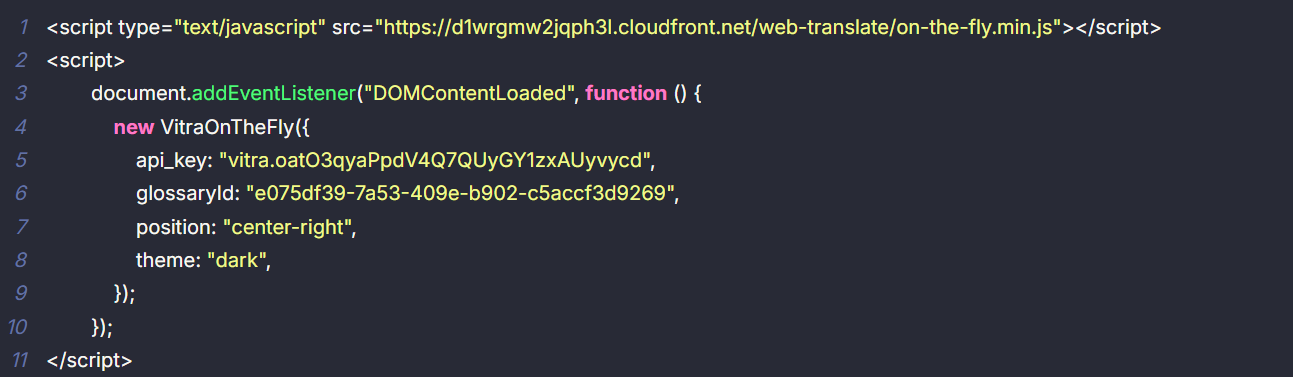
Step 2: Copy the Vitra Snippet
- After project creation, copy the Vitra / Universe Website Translation snippet from your dashboard.
Step 3: Open Your Vue Project Entry File
- Since Vue is already set, you only need to add the snippet globally so it loads on every route.
- Search src/app.html
Step 4: Paste Snippet in the Global <head>
- Open the file, find </head>, and paste the snippet just above it.
- Add a simple label like:
- <!-- Translate Website -->
Step 5: Save & Deploy
- Save the file, rebuild your project, and deploy.
- That's it - Universe Website Translation will now load across your Vue app (including SPA route changes) without any extra Vue configuration.
Where to go next
Vue.js Website Translation and Localization is one way into Vitra.ai. Website translation is the capability doing the work behind it.
CapabilityWebsite translationRead nextTranslate a Vue App With Vue I18nRead nextContinuous localization for always-on content
Browse every connector on the integrations directory.