
Custom Integration
Universe Website Translation integration provides AI translation for websites and apps via flexible APIs, supporting any tech stack.
Using Universe Website Translation with Custom Integration
- ✓If your platform or framework is not listed (or you prefer manual setup), select:
- ✓Project Technology → Others
- ✓This option is designed for:
- ✓Custom-built websites
- ✓Static HTML sites
- ✓Custom CMS
- ✓Internal enterprise portals
- ✓Any unsupported framework
- ✓You don't need special configuration.
- ✓You just need to add the Universe Website Translation snippet manually.
Workflow
How it works
01
Select "Others" as Project Technology
- When creating a project:
- Choose Others
- Complete project setup
02
Add the Snippet to Your Website
Open your website's main layout file.
- Look for the global <head> section:
- <head>
- Paste the snippet just before:
- <!-- Translate Website -->
- <script>
- /* Paste Vitra Snippet Here */
- </script>
- </head>
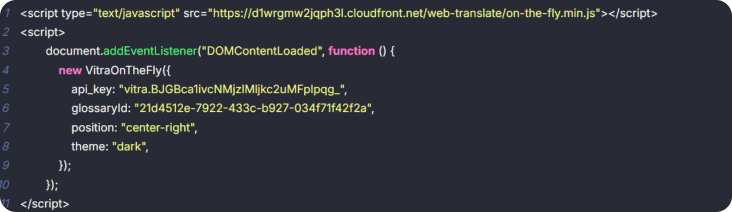
Example:
Save the file.
03
Deploy / Publish
- After saving:
- Upload the updated file
- Redeploy your site
- Clear cache (if using CDN)
That's it
Universe Website Translation is now active.
What Happens After Integration?
- ✓Once added, Universe Website Translation:
- ✓Works across all pages
- ✓Detects dynamic content
- ✓Supports SPA frameworks
- ✓Preserves layout & styling
- ✓Reduces international bounce rates
- ✓No dependency on backend language setup.
Where Exactly Should It Be Added?
- →For best performance:
- →Inside global <head>
- →In layout file used across all pages
- →Not inside a single page template
- →Not inside a specific component
- →If your platform provides:
- →"Custom Header Script"
- →"Global JS Injection"
- →"Site-wide Code"
- →"Header HTML"
- →You can paste it there instead of editing files.
Safe & Reversible
- →To disable:
- →Remove the snippet
- →Redeploy
- →No impact on site structure.
When Should You Use "Others"?
- →Use it when:
- →Your framework is not listed
- →You're using a proprietary CMS
- →You're using Webflow export
- →You have static hosting (S3, Netlify, Vercel static)
- →You want full manual control
Next step
Connect nowWhere to go next
Custom is one way into Vitra.ai. The Vitra.ai platform is the capability doing the work behind it.
CapabilityThe Vitra.ai platformRead nextBuild a Custom Translation API IntegrationRead nextBuilding a custom translation integration
Browse every connector on the integrations directory.