Layer-preserving translation
Text is extracted from the live design, translated, and reinserted into the same layers — not flattened, retyped, or pasted over.
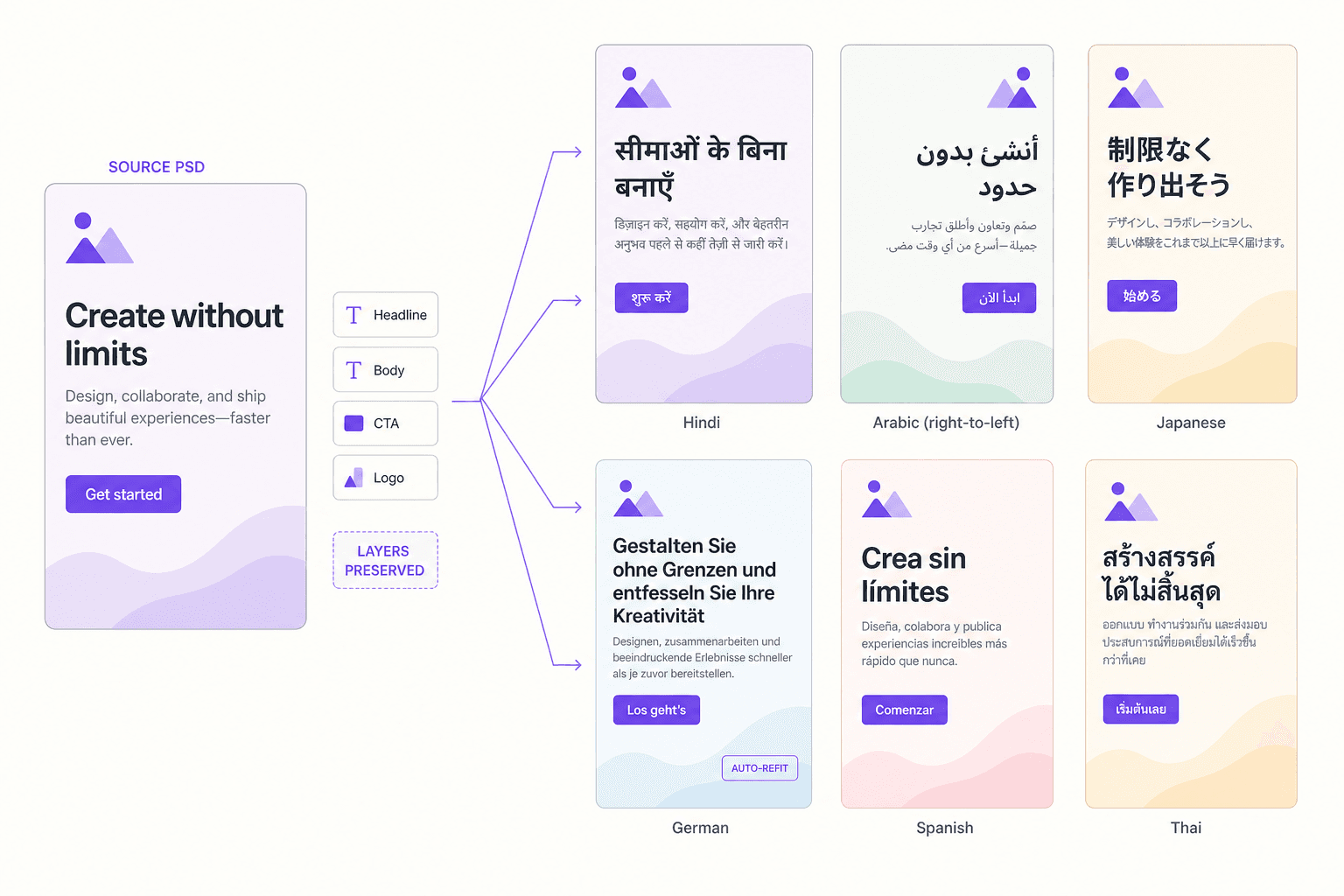
Translate the text inside creatives, designs, and layouts into 120 languages without rebuilding the file. Layers, fonts, and positioning survive — text is extracted, translated, resized to fit, and put back where it belongs.
Free to start · 120 languages · No credit card required
25+
image and design formats
< 5s
for a design to come back translated
6
design and Office apps with a native plugin
Text is extracted, translated, re-fitted and put back where it belongs — layers, fonts and positioning intact. No rebuild, no copy-paste, no spreadsheet.
Source design
PSD, AI, INDD, Figma frame — or a flat JPG.
Step 1 of 5
Run it from the plugin inside Photoshop, Illustrator, InDesign, Figma or Canva — or upload a flat image and let it be segmented.
25+
formats supported
Capabilities
Text is extracted from the live design, translated, and reinserted into the same layers — not flattened, retyped, or pasted over.
German runs long, Chinese runs short. Type is re-fitted to the box automatically so layouts survive the language change.
Translate without leaving Photoshop, Illustrator, InDesign, or Figma. The plugin reads the open document and writes the localized version back.
No spreadsheet handoff between designers and translators, which is where character corruption and version drift usually creep in.
Every approved string is reused across images, video, documents, and web, so the same phrase never gets two different translations.
PNG, JPG, GIF, PSD, AI, INDD, SVG, XML, JSON and more — including multi-artboard and multi-page source files.
What comes out
Why it matters
Copy in a document is easy to localize. Copy baked into a layout is where global campaigns quietly stall.
The campaign ships together or not at all
A launch held up because forty creatives are still in a designer's queue is a launch that misses its moment in every market except the first one.
Rebuilding a layout per language is waste
The design decisions were already made and approved. Recreating them once per market is pure duplication — and every duplicate is a new place for an error to enter.
Copy-paste is where the mistakes live
Moving strings between a spreadsheet and a design file corrupts characters, drops diacritics and mismatches lines. It is the single most common defect in localized creative.
A broken layout reads as a careless brand
German runs long, Arabic runs right to left, Devanagari changes line height. Text that overflows or clips tells a customer the market was an afterthought.
The design was signed off once. Every market that gets a rebuilt version of it is a market getting a second-best one.
The file comes back as a file — layered, editable and correctly typeset — not as a flattened picture of a translation.
Layers survive the round trip
A PSD returns as a PSD. Layers, styles, smart objects, paragraph styles and threaded frames stay intact, so the designer can still work on what comes back.
Type re-fits itself
Font size, line breaks and box geometry adjust when the translation is longer or shorter, with target-language font equivalents recalled from the brand kit.
Inside the tool you already use
Plugins for Photoshop, Illustrator, InDesign, Figma, Canva and Office 365 mean the workflow is a panel in your app, not another web tool to log into.
It knows what you have approved before
Every string resolves against VitraTM and your glossary first, so the banner says exactly what the website and the dubbed video already say.
Three agents check the result
An AI proofreader, an AI back translator and an AI QC report run over the output, with human review wherever you want one.
25+
image and design formats
< 5s
for a design to come back translated
6
design and Office apps with a native plugin
How it works
Keep the brief, language resources, and review decisions connected. Use the finished result in Universe or export it for the next step.
Use the plugin inside your design tool, or upload files straight to Universe for batch runs.
Choose source and target languages and the glossary the translation should follow.
Text is pulled, matched against translation memory, translated where needed, resized, and written back into the design.
Check the visual QC report, correct anything flagged, and export a per-language file set.
Who it is for
Take one master key visual into every market without rebuilding it per language.
Localize shelf, POS, and packaging artwork with typography that still fits the die line.
Translate Figma screens so design and engineering see real localized strings before build.
Localize diagrams, callouts, and figures inside manuals without redrawing them.
FAQ
No. Text is extracted from the live layers, translated, and written back into those same layers. The exported PSD or AI file stays editable exactly as the original was.
Font size and, where needed, tracking are adjusted automatically to fit the original text box, so layouts hold up in languages that expand or contract significantly.
Adobe Photoshop, Illustrator, and InDesign, plus Figma. Microsoft Word and PowerPoint are supported for document work, and the same engine is available over API for anything else.
A generic translator returns strings. Universe understands the design: it knows which text is a headline versus a legal line, applies your glossary and translation memory, refits typography, and runs a visual QC pass on the rendered result.
Everything in Vitra Universe shares one translation memory, one brand kit, and one quality bar — so the work you do here makes everything you do next faster.