Vitra AI
Search
Vitra AI
VERTICALS
RetailFinancial ServicesTourismHealthcareNews MediaE-commerceLogisticsPharmaceuticalUniversitiesBankingEdtechFintechFMCGMedia AgencyProduction MediaLSPMarketingSalesHROperationsDesignEngineeringSupportCatalogueProductLearning & DevelopemntPersonalised video invitaionsAccelerate revenueAI Ad productionAI UGC contentAutomated content productionAvatar videos for E-commerceCall IntelligenceContent TranslationCustomer Onboarding and RetentionE-commerce LocalizationImprove Customer ExperienceReduce Customer ChurnPrivate LLMTranslate.videoTranslate.photoTranslate.websiteShort.videoIntegrationsBlogsLanguagesTranslate.videoTranslate.photoShort.videoNews RoomTerms & conditionsPrivacy PolicyAbout Us
←All Tools
01Figma02Adobe Photoshop03Adobe Illustrator04Adobe Indesign05Microsoft Word06Google Sheets07Canva08Youtube09Instagram10WordPress11Shopify12React JS13Next JS14Vue JS15Angular JS16Nuxt JS17Svelte18Drupal19Django20Flask21Salesforce22Ghost CMS23Hubspot CMS24Custom Integration25XML Translation26Dita Maps27XLIFF Translation28Text Translation29Json Translation30HTML Translation31PPT to Videos32GIF Translation33Blog to Video34Markdown Translation35MIF Translation36Adoc Translation37ASC Translation38ASCII Doc Translation39DocBook Translation40PPT-PPTX Translation41POT Translation42POTX Translation43PPTM Translation44POTM Translation45Dita Translation46PDF Translation47PHP Translation48TTX Translation49YAML/YML Translation50PO Translation51Properties Translation52XTG Translation53IOS Strings54Android Strings55RESX Translation
←All Tools
01Figma02Adobe Photoshop03Adobe Illustrator04Adobe Indesign05Microsoft Word06Google Sheets07Canva08Youtube09Instagram10WordPress11Shopify12React JS13Next JS14Vue JS15Angular JS16Nuxt JS17Svelte18Drupal19Django20Flask21Salesforce22Ghost CMS23Hubspot CMS24Custom Integration25XML Translation26Dita Maps27XLIFF Translation28Text Translation29Json Translation30HTML Translation31PPT to Videos32GIF Translation33Blog to Video34Markdown Translation35MIF Translation36Adoc Translation37ASC Translation38ASCII Doc Translation39DocBook Translation40PPT-PPTX Translation41POT Translation42POTX Translation43PPTM Translation44POTM Translation45Dita Translation46PDF Translation47PHP Translation48TTX Translation49YAML/YML Translation50PO Translation51Properties Translation52XTG Translation53IOS Strings54Android Strings55RESX Translation
Drupal

Drupal

Make Drupal websites multilingual with Vitra by automatically translating pages, modules, and site content while keeping structure, SEO, and layouts intact.

Connect

Add Translate.website to Drupal in Minutes

Running your website on Drupal?

You don’t need custom development or theme edits to make your Drupal site multilingual.

Using Drupal’s module system, you can safely inject the Translate.website script in just a few steps.

Lets walk through it.
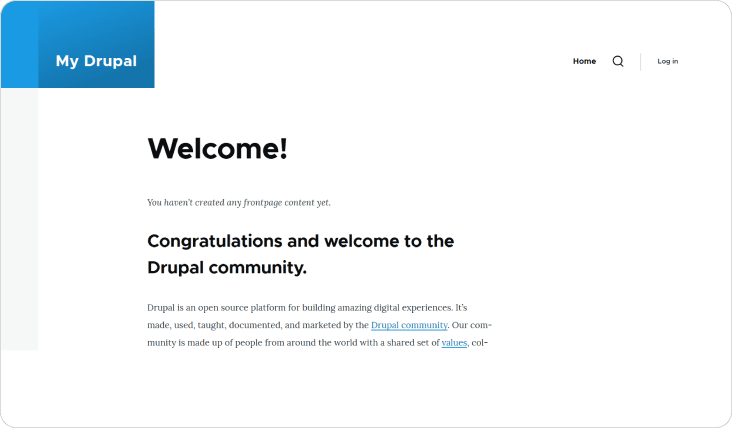
Drupal overview

Login to Your Drupal Admin Dashboard

  • To begin:
  • Open your browser
  • Visit: yourwebsite.com/user/login
  • Enter your admin credentials
  • Click Log-in
  • Once logged in, you’ll access the Drupal administrative dashboard.

How It Works

Step 1: Click on “Extend” and Search for Asset Injector

  • From the top admin toolbar, click Manage
  • Select Extend
  • In the search bar, type: Asset Injector
  • Confirm that the module is enabled

This ensures the module is active and ready for configuration
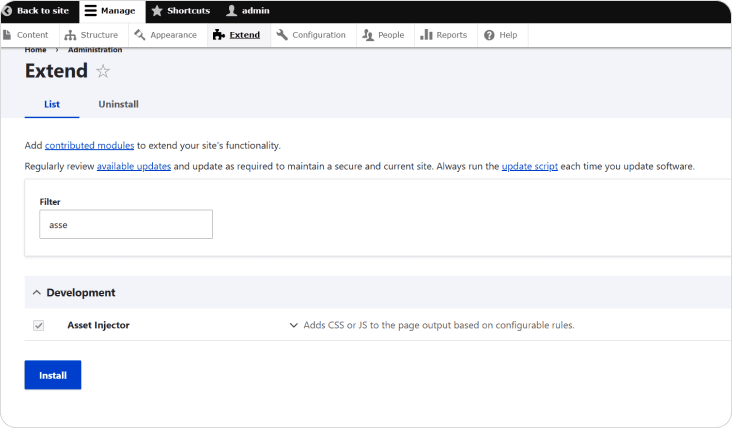
Click on “Extend” and Search for Asset Injector

Step 2: Expand Asset Injector and Click “Configure”

  • Click the small dropdown arrow (if collapsed)
  • Click Configure

This will redirect you to the Asset Injector configuration panel. This section allows you to inject JavaScript or CSS safely into your Drupal website without editing theme files.
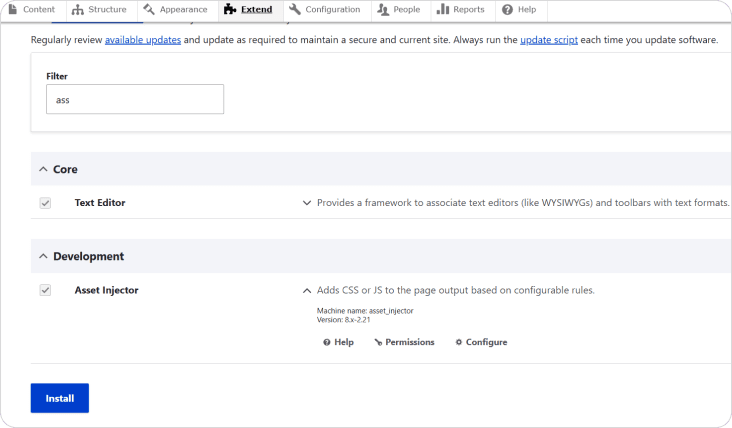
Expand Asset Injector and Click “Configure”

Step 3: Click on “JS Injector”

Select JS Injector

  • Inside the Asset Injector configuration screen:
  • This section is specifically used for injecting JavaScript globally across your Drupal website. Since Translate.website runs via JavaScript, this is the correct option.
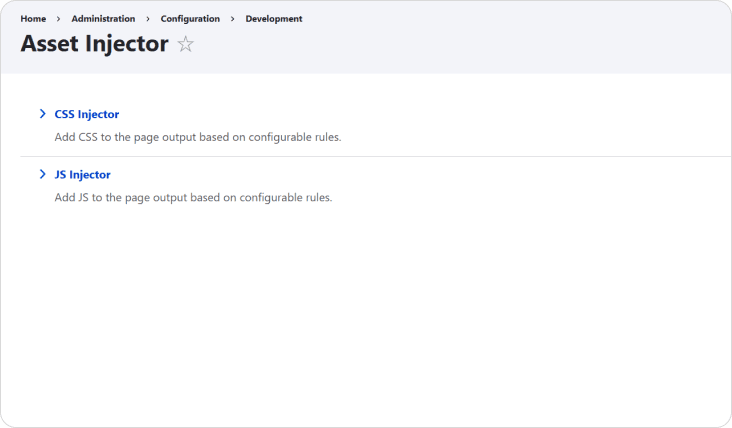
Click on “JS Injector”

Step 4: Click “Add JS Injector”

  • Click the Add JS Injector button
  • A new configuration form will appear

This is where you’ll create a global script entry.
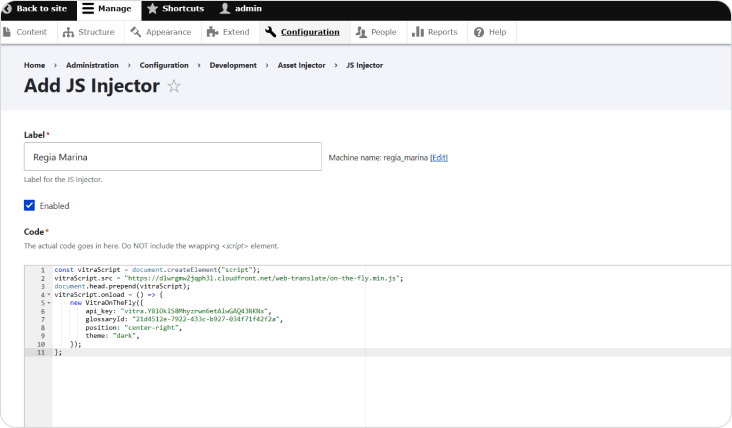
Click “Add JS Injector”

Step 5: Paste the Vitra Snippet

  • This is where you’ll create a global script entry.
  • In the Label field, enter:
  • Paste your Translate.website (Vitra) snippet
  • Ensure the script is complete and not truncated
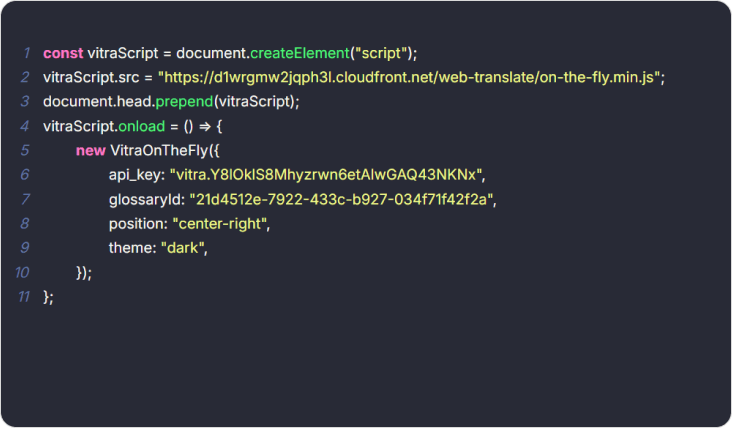
Paste the Vitra Snippet

Step 6: Set Conditions (Recommended Configuration)

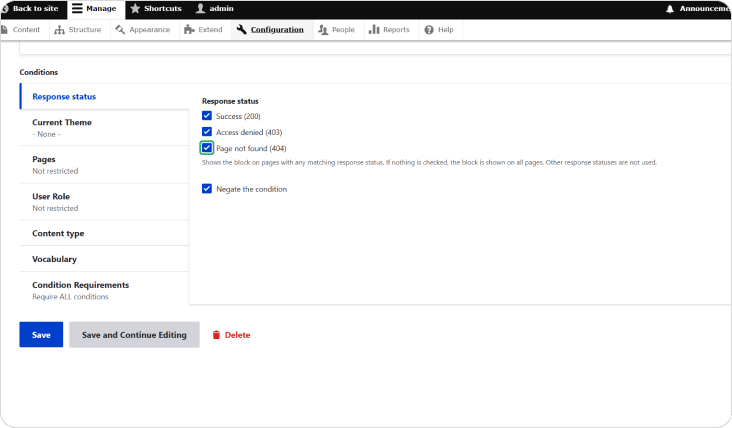
  • Set the injector to load on All Pages
  • Do not restrict by content type
  • Leave role-based visibility unrestricted (unless needed)
  • This ensures the translator works across:
  • Nodes
  • Views
  • Landing pages
  • Blog posts
  • Menus
  • Footer
  • Drupal Commerce pages

For full site coverage:
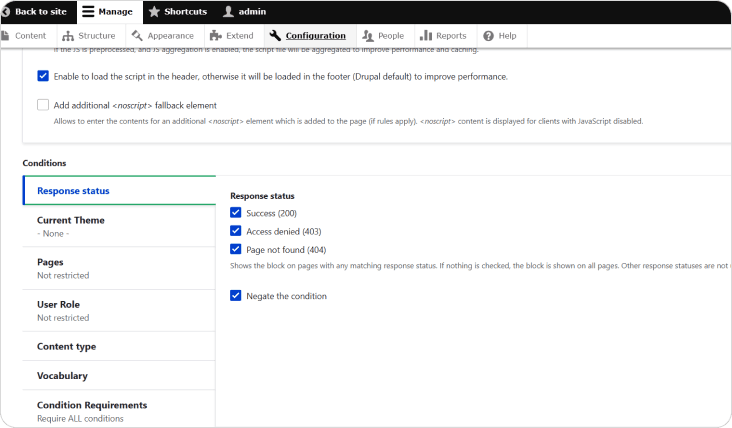
Set Conditions (Recommended Configuration)

Step 7: Click “Save”

  • Once everything is configured:
  • Click Save
  • Clear Drupal cache (recommended)
  • Refresh your website
Click “Save”

🚀 What Happens After Saving?

  • The script loads globally
  • All page content becomes translatable
  • Dynamic content is detected
  • Layout remains intact
  • No theme edits were required
  • No content duplication occurs

🔁 Safe & Reversible

  • If you need to disable it:
  • Go back to JS Injector
  • Edit or disable the injector
  • Save changes
  • No core files are modified.
  • No database changes occur.

Translate.website is now active across your entire Drupal site.

Translate.website is now active across your entire Drupal site.

Footer

Power Your Global Content Strategy with AI Translation

Unlock seamless communication across departments - from Marketing to Ops - with AI-powered translations tailored to your business needs.

Products
Translate.video
Translate.photo
Translate.website
Short.video
Personalized Videos
Personalized Creatives
Integrations
Chatbot
LLM
Solutions
Customer Onboarding and Retention
Personalized Video Invitations
Avatar Videos for E-commerce
Call Intelligence
AI UGC content
AI Ad Production
Private LLM
Content Translation
Improve Customer Experience
Reduce Customer Churn
Accelerate Revenue
Automated Content Production
E-Commerce Localization
Industry
Retail
Financial Services
Tourism
Healthcare
News Media
Production Media
Logistics
Pharmaceutical
Universities
E-commerce
FMCG
FinTech
Banking
Media Agency
EdTech
LSP
Partnership
AWS Partnership
DeepL Partnership
About
Contact Us
Support
News Room
Refund Policy
Terms and Conditions
Privacy Policy
Data Processing Agreement
Company
Vitra.ai 4th floor, Gopalan Coworks, Banashankari 3rd Stage, Banashankari, Bengaluru, Karnataka 560085 MSME - UDYAM-KR-03-0023596 CIN -U72900KA2020PTC135076
contact@vitra.ai

Create, Personalize, and Translate Content 100x Faster with GenAI.