
Svelte
Svelte is a modern JavaScript framework for building fast user interfaces. It compiles code at build time for better performance.
Use Universe Website Translation on a Svelte Website
If your project is built with Svelte, Universe Website Translation can be enabled by adding one lightweight script globally so it loads on every page.
No backend changes.
No routing changes.
Just a safe global integration.
Setup for Svelte
Step 1: Open Your Base Template
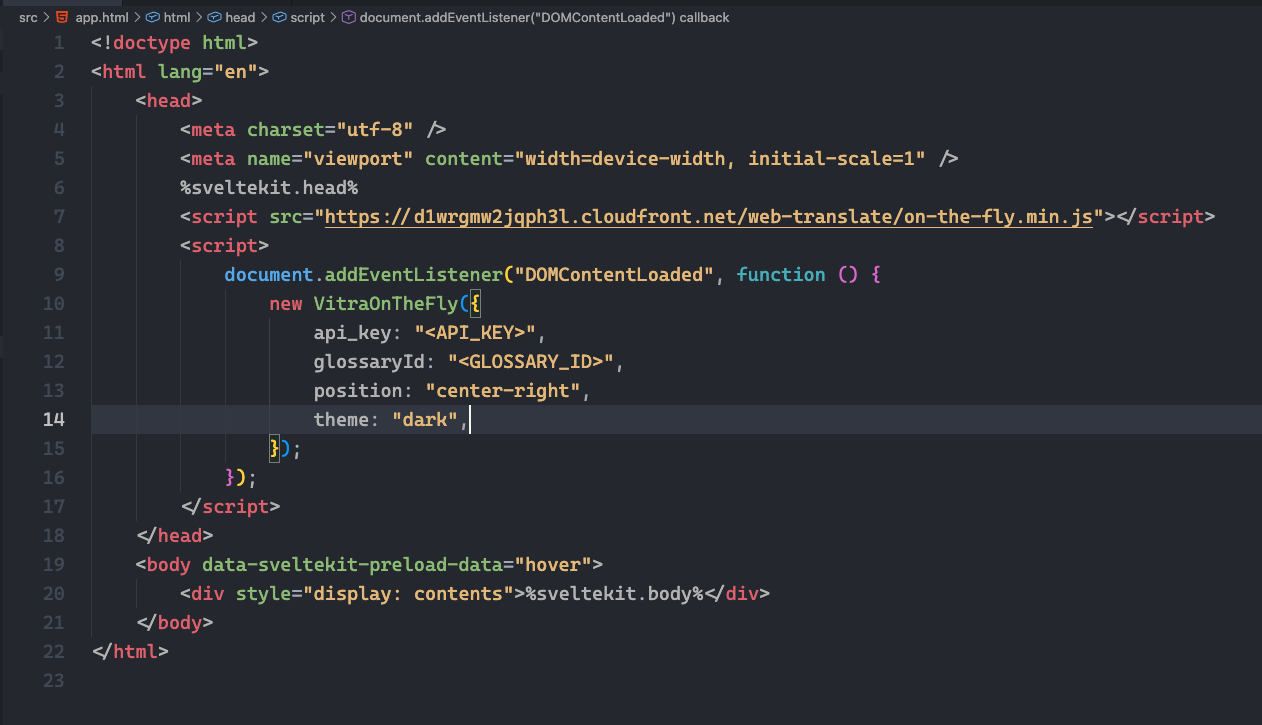
Navigate to your svelte project and open:
`src/app.html
(Or the main template file that contains the global <head> section.)
Step 2: Locate the <head> Section
Find:
</head>
Step 3: Paste the Vitra Snippet
Just above </head>, paste your Vitra / Universe Website Translation snippet.
Example
<!-- Translate Website -->
<script>
  /* Paste Vitra Snippet Here */
</script>
</head>
Step 4: Save & Restart
Save the file and restart your svelte server:
python manage.py runserver
Important for Svelte (SPA + SSR)
Svelte/SvelteKit apps:
- render dynamically
- use client-side navigation
- may use SSR (SvelteKit)
So the snippet must be:
- Global (index/app.html or root layout)
- Not inside a single component/page
What Happens After Setup?
Once active, Universe Website Translation:
- Translates Svelte-rendered content
- Works across navigation without reload
- Detects dynamic DOM updates
- Preserves layout & styling
Safe & Reversible
To disable:
- Remove the snippet from index.html / app.html
- Rebuild / redeploy
Where to go next
Svelte Website Translation and Localization is one way into Vitra.ai. Website translation is the capability doing the work behind it.
Browse every connector on the integrations directory.