One repository, every modality
Video, image, audio and documents in a single store, with the source you uploaded and the finished artifact kept together rather than scattered across the tool that happened to produce each one.
Every AI tool is an island, so the work between them is export, download, re-upload, and a filename with v3_final in it. The Intelligent Asset Manager is the repository underneath Universe: every upload, every intermediate artifact and every finished asset lives in one place, and workflows start from a file already there rather than from one you moved.
Free to start · 120 languages · No credit card required
1 upload
instead of five round trips
Your S3
if you want the data in your account
Every
capability reading the same store
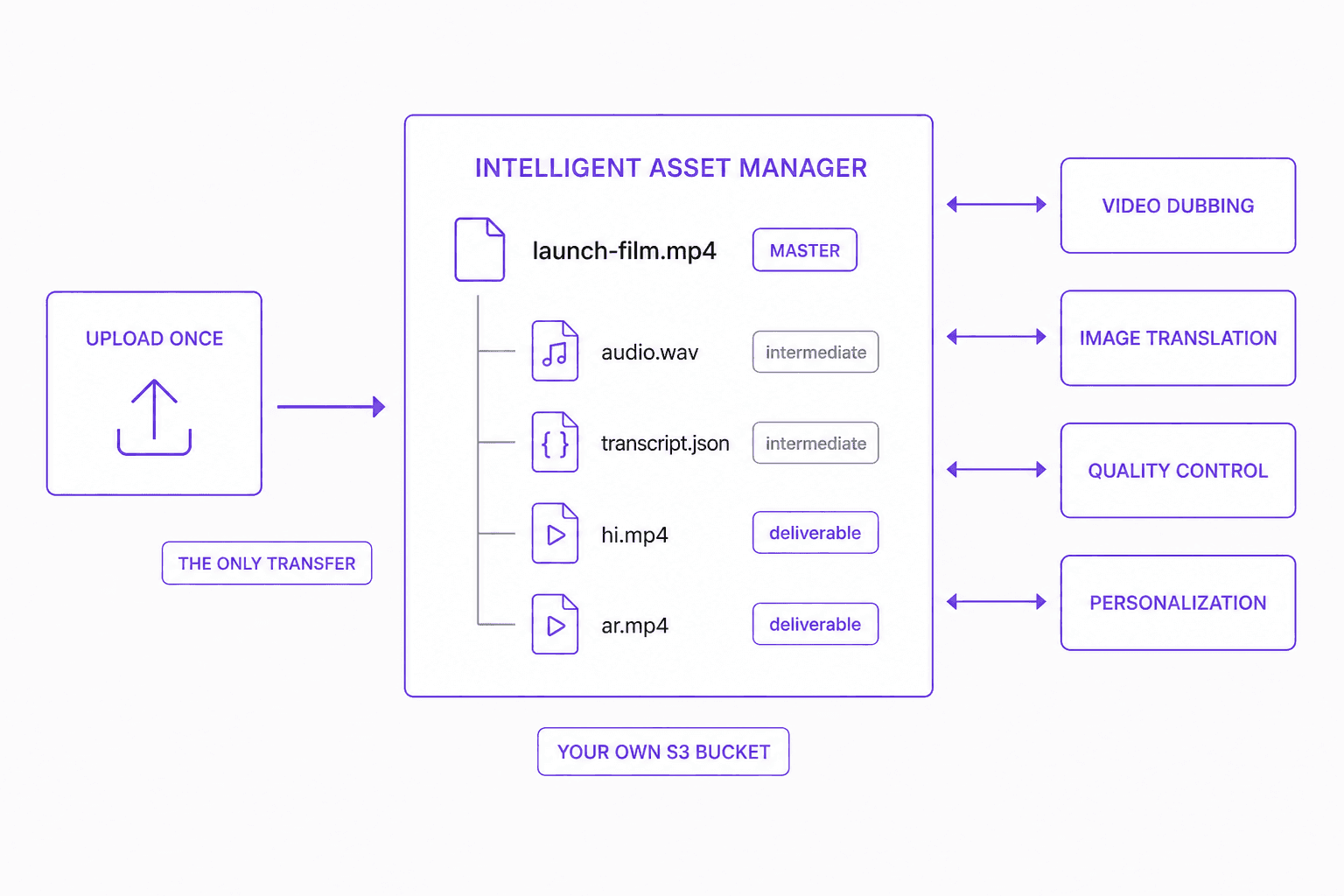
Every source, every intermediate and every finished artifact lives in one store — and workflows start from a file already there rather than one you moved.
Source asset
Video, image, audio or document.
Step 1 of 5
Upload, or connect your own S3 bucket and address existing files in place. After this, nothing is downloaded and re-uploaded again.
1
upload, then never again
Capabilities
Video, image, audio and documents in a single store, with the source you uploaded and the finished artifact kept together rather than scattered across the tool that happened to produce each one.
Select a stored file and launch dubbing, translation, creation or personalization directly from it. There is no export step, because the file is already where the workflow runs.
A transcript, an extracted audio track, a translated design file — each is stored as an asset in its own right, so the next workflow consumes it instead of regenerating it.
Point the asset manager at your own AWS S3 bucket, so assets live in your account, your region and under your lifecycle and retention rules. Storage becomes yours while the workflows stay managed.
Video dubbing, video creation, image translation, image creation and personalization all resolve assets from here, which is what removes the download-and-re-upload step between them.
Each derived asset records what it came from, so a dubbed cut traces back to its master and a localized banner to the design file it was built from — without relying on a naming convention.
Assets are scoped per organization with role- and entitlement-based access control, so an agency can hold a separate library per client and reviewers see only what their role permits.
Assets are addressable over MCP, REST API, SDK and CLI, so a DAM, CMS or pipeline you already run can deposit files and trigger the workflow that consumes them.
What comes out
Why it matters
Producing one localized campaign across separate AI products means exporting from each and importing to the next, over and over.
Export-import is most of the work
Five tools means five uploads and five downloads per asset. None of that is production; all of it is time, bandwidth and opportunity for the wrong file to move forward.
Duplicates become several versions of the truth
Once a file exists in four places, nobody can say which one is current — and a naming convention is not a system of record.
Intermediates get thrown away and repaid for
The transcript, the extracted audio, the translated design file. Each is discarded at the tool boundary and regenerated later at full cost.
Retention and residency need one boundary
Assets scattered across a dozen vendor accounts cannot inherit a lifecycle policy, a region or an access rule that anyone has actually approved.
Count the uploads in your last campaign. That number is the tax, and it has nothing to do with the work.
It is not a folder beside the tools. It is the store underneath them, and work starts from a file already in it.
Workflows launch from the asset
Select a stored file and start dubbing, translation, creation or personalization against it. There is no export step, because the file is already where the workflow runs.
Intermediates are first-class
Transcripts, stems and translated design files are stored as assets in their own right, so the next workflow consumes them instead of regenerating them.
Lineage you can follow
Each derived asset records what it came from, so a dubbed cut traces back to its master and a localized banner to the design file it was built from.
Your bucket, your region, your rules
Point it at your own S3 and every artifact lives in your account under the lifecycle and retention policy you already had approved.
Reachable from your own systems
Addressable over MCP, API, SDK and CLI, so an existing DAM or CMS can deposit a file and trigger the workflow that consumes it.
1 upload
instead of five round trips
Your S3
if you want the data in your account
Every
capability reading the same store
How it works
Keep the brief, language resources, and review decisions connected. Use the finished result in Universe or export it for the next step.
Upload, or connect your own S3 bucket and let existing files be addressed in place. This is the only transfer in the whole chain.
Start any Universe workflow directly against a stored asset — no export, no re-upload, no local copy that immediately goes stale.
Transcripts, stems, extracted layers and translated files are written back as assets, ready for the next step or for a different workflow entirely.
Every output returns to the same library with its lineage recorded, so the master and its forty market versions live together rather than in forty download folders.
Who it is for
A campaign that touches five AI tools normally means five uploads and five downloads per asset. Here the file is uploaded once and never leaves.
The source video, its transcript, its 40 dubbed versions and their subtitle tracks stay in one place with the relationships intact.
Separate, access-controlled libraries per client under your own branding, with your own storage if you want the data in your account.
Assets in your own bucket inherit the region, lifecycle and retention policy you already had approved, instead of a vendor's defaults.
FAQ
The transfer tax between tools. Producing one localized campaign across separate AI products means exporting from each and importing to the next, which is slow, duplicates every file, and leaves several versions of the truth. When the store sits underneath the platform, the workflow starts from the asset and the transfer disappears.
Yes — that is the point of it. Select a file already in the library and start dubbing, translation, creation or personalization against it. Nothing is downloaded or re-uploaded, and the output returns to the same library.
Anything a workflow produces on the way to its result — a transcript, an extracted audio track, a translated design file. Each is stored as an asset in its own right, so a later workflow reuses it rather than regenerating it, which saves both time and the cost of the second generation.
Yes. Connect your own AWS S3 bucket and assets are held in your account, your region, under your lifecycle and retention rules. That keeps residency and retention decisions with you while the workflows remain managed.
Inside the content production loop, yes — those tools are usually where creative assets sit only because there was nowhere better, and the constant export-import between them and each AI tool is the cost. It is not a general corporate file store, and it is not trying to be your intranet or your document management system.
It complements rather than replaces one. Assets are addressable over MCP, REST API, SDK and CLI, so an existing DAM can deposit files and trigger the workflow that consumes them, and finished artifacts can be pushed back to it as the system of record.
Access is scoped per organization with role- and entitlement-based control, so an agency can keep a separate library per client and a reviewer sees only what their role allows. Combined with your own bucket, both the boundary and the storage stay under your control.
Everything in Vitra Universe shares one translation memory, one brand kit, and one quality bar — so the work you do here makes everything you do next faster.