One master, every size
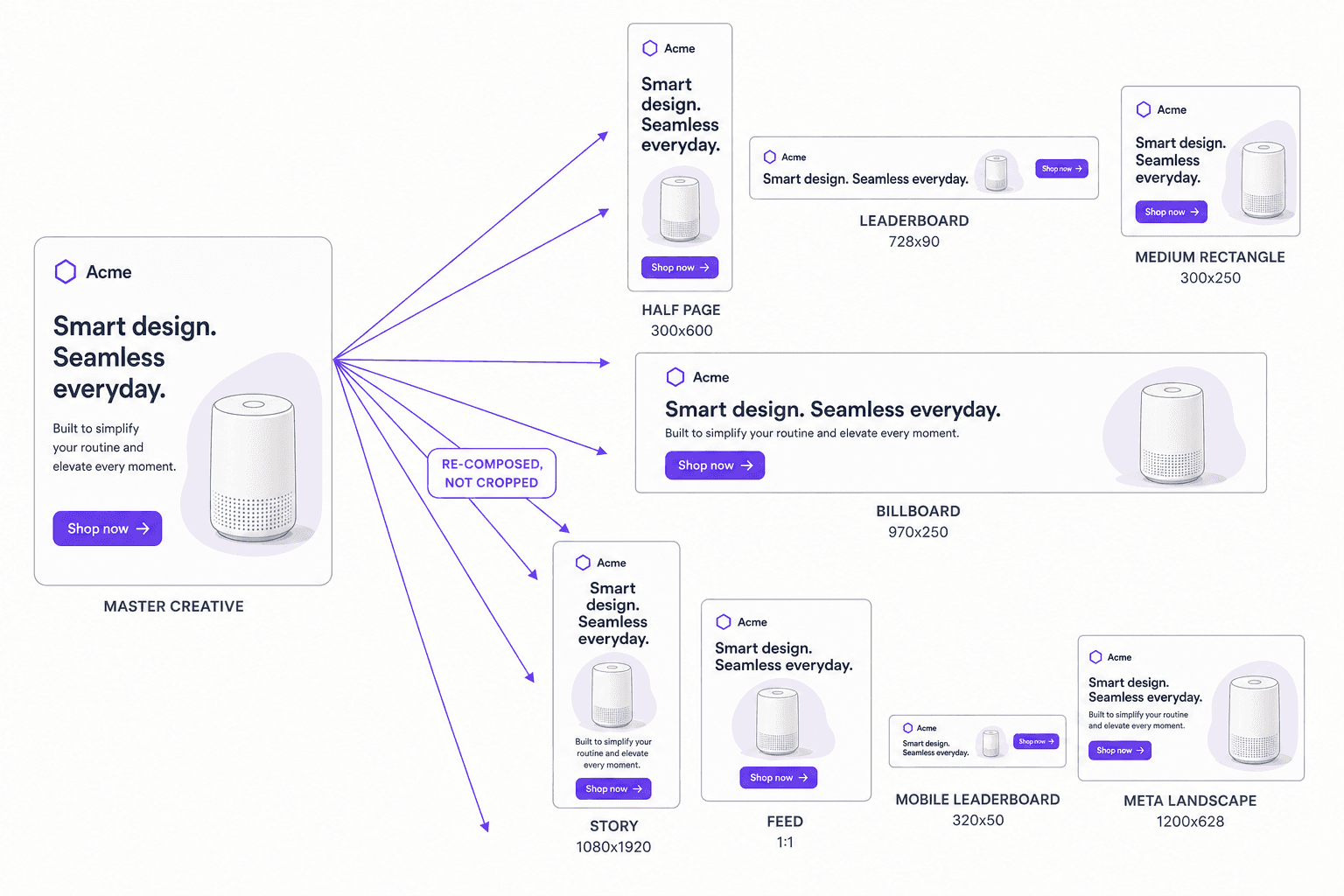
Generate the full placement matrix — feed, story, banner, display, print — from a single approved creative, recomposed rather than letterboxed.
Take one master creative and adapt it to every placement, audience, and market — resized, recomposed, and re-messaged automatically, with the brand rules held constant across all of it.
Free to start · 120 languages · No credit card required
20+
built-in ad and social presets
5
aspect ratios from a single node
1 master
to every placement you buy
Not a crop. Layout, focal point and copy are re-composed for each frame, so a billboard and a story both look designed rather than cut down.
Master creative
The one the brand team signed off.
Step 1 of 5
The master is the reference for everything that follows — its brand rules, its focal point, its hierarchy.
1
approved master
Capabilities
Generate the full placement matrix — feed, story, banner, display, print — from a single approved creative, recomposed rather than letterboxed.
Subject, logo, and copy are repositioned for each aspect ratio so nothing important gets cropped out on the way to a 9:16.
Swap the offer, the model, the language, or the product per segment while the layout system stays constant.
Every adaptation keeps its lineage back to the master, so a change at the top can be pushed through the whole set.
Clear space, logo lockups, palette, and typography rules are enforced on each variant instead of being re-checked by hand.
Adapt an entire campaign folder or catalogue in one run, or call it per asset from your own pipeline.
What comes out
Why it matters
The asset is approved. What follows is a hundred mechanical variations that nobody wants to make by hand.
Every channel has its own frame
Story, feed, leaderboard, half page, billboard, marketplace tile. A campaign that only exists in one ratio simply does not run in most of the places it was budgeted for.
Cropping throws away the idea
A hard crop to 9:16 cuts the product, the logo or the offer. The reason resizing gets done by hand is that automatic resizing usually ruins the composition.
Relevance beats reach on cost per result
A creative matched to the viewer's market, language and offer earns its impression. One generic asset served everywhere pays for attention it does not get.
The refresh cycle never stops
Seasons, promotions, price changes and new SKUs all re-open the same production. Doing it manually means paying the full cost every time.
Every placement you cannot fill is inventory you already paid for and cannot use.
This is recomposition, not resizing — the elements are understood, then re-laid-out for the new frame.
Elements are moved, not cropped
The creative is segmented into text, logo, product and subject, then each is resized and re-placed for the target frame so the composition still works at 9:16 and at 970×250.
The preset list is already the industry's
IAB and Google display sizes, Meta, Instagram, Facebook, LinkedIn and WhatsApp formats ship built in, alongside any custom dimension your team defines.
Copy changes with the market, not just the size
Message, offer and language vary per audience while the brand rules stay locked, so a variant is genuinely local rather than the same creative in a different box.
Regional context, not just regional words
Backgrounds, landmarks and the people shown can be adapted to the market — the difference between a translated creative and one that looks like it was made there.
Versioned, so a master change propagates
Variants stay linked to their master. When the master changes, you re-run rather than re-source a hundred files from a hundred folders.
20+
built-in ad and social presets
5
aspect ratios from a single node
1 master
to every placement you buy
How it works
Keep the brief, language resources, and review decisions connected. Use the finished result in Universe or export it for the next step.
Start from an approved creative or a design file with its layers intact.
Pick the aspect ratios, channels, and markets you need. Presets cover the common ad and social specs.
Universe recomposes for each size and applies per-segment copy, language, and offer changes.
Review the set, fix anything QC flags, and export or push to your ad and asset systems.
Who it is for
Fill every placement in the media plan without a manual resize queue.
Meet each platform's spec sheet from one approved master.
Give every location its own address, offer, and language on shared national creative.
Re-skin an entire library for a new season in a single batch.
FAQ
A resizer scales and crops. Adaptive creative recomposes: it re-lays out the subject, logo, and copy for each aspect ratio, applies brand rules, and can change the message per audience — so a 9:16 is a designed variant rather than a squeezed 16:9.
Yes. Language, offer, pricing, legal lines, and imagery can all vary per variant while the layout system and brand rules stay fixed.
Variants keep their lineage to the master, so an edit at the top can be re-pushed through the whole set rather than re-created variant by variant.
Everything in Vitra Universe shares one translation memory, one brand kit, and one quality bar — so the work you do here makes everything you do next faster.