Nuxt JS
Nuxt.js is a framework built on Vue.js for creating fast web applications. It offers features like routing and server-side rendering out of the box.
Using Translate.website in a Nuxt.js Project (Pre-Installed Setup)
If Nuxt.js is already available in your environment, you don't need to install anything. You only need to add the Translate.website snippet globally so it loads on every page and route.
Step-by-Step Configuration for Nuxt.js
Step 1
When creating a new project:
- Choose Nuxt.js
- Finish the setup wizard
- Generate/deploy the project
Now you just need to add the Vitra / Translate.website snippet to Nuxt's global head.
Step 2
This prevents Nuxt from sanitizing inline script content.
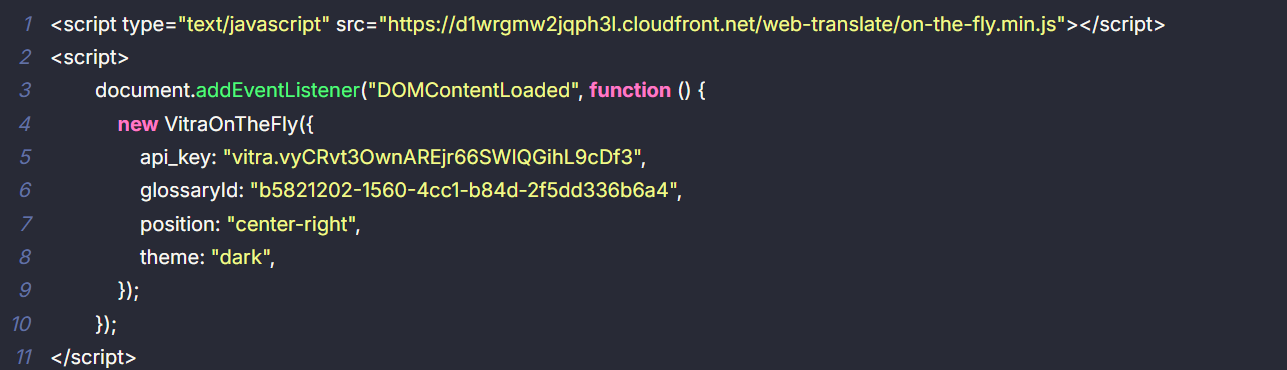
Step 3
After saving config:
- npm run dev
For production:
- npm run build
- npm run start
Translate.website is now active across all Nuxt routes.
Important for Nuxt (SPA + SSR)
Nuxt uses:
- SSR (server rendering)
- client navigation
- hydration
So the snippet must be:
- global config level (nuxt.config)
- not only inside one page/component
That ensures it works across every route.
Easy to Remove
To disable:
- Remove the script block from nuxt.config
- Rebuild / redeploy
No side effects.