Django
Enable multilingual Django applications with Vitra by dynamically translating templates and web content while preserving site structure, performance, and scalability.
Install Translate.website on Django
If your website is built using Django, you can easily enable multilingual support by adding a single Vitra snippet to your global template.
Since Django is already inbuilt in your system, no additional packages or configuration are required.
You only need to insert the snippet inside your main layout file so it loads across all pages.

Django Integration (Django Already Inbuilt)
- No changes required in settings, URLs, or views.
How It Works
Step 1: Open Your Base Template
- Navigate to your Django project and open:
- templates/base.html
- (Or the main template file that contains the global <head> section.)
Step 2: Locate the <head> Section
Just above </head>, paste your Vitra / Translate.website snippet.
Step 3: Paste the Vitra Snippet
- `
- <!-- Translate Website -->
- <script>
- /* Paste Vitra Snippet Here */
- </script>
- </head>`
Step 4: Save & Restart
- Save the file and restart your Django server:
- python manage.py runserver
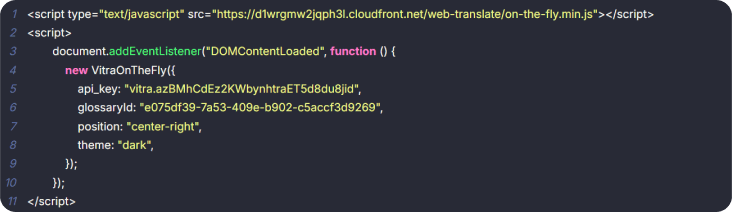
Translate.website is now active
Translate.website is now active across your entire Django application — including all templates extending base.html and dynamic pages.