Next JS
Next.js is a React framework for building fast, scalable web applications. It provides built-in features like routing and server-side rendering.
Using Translate.website in a Next.js Project (Pre-Installed Setup)
If Next.js is already configured in your environment, you do NOT need to install anything additional.
You only need to inject the Translate.website snippet at the global level so it loads across all pages.
Step-by-Step Configuration for Next.js using Next.js (App Router – Next 13+)
Step 1: Install the Package
- Install the Vitra Web Translator package in your Next.js project:
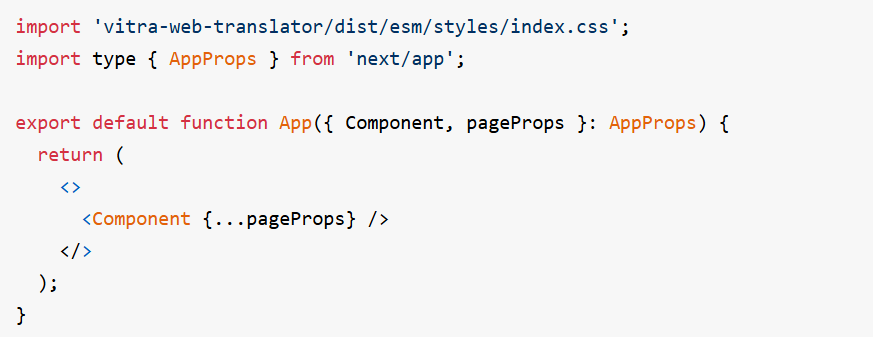
Step 2: Create a Common Component
- Build a reusable translation component that can be used across your website or application. This ensures consistent configuration, reduces repetitive code, and makes it easier to manage updates or changes to your translation setup.
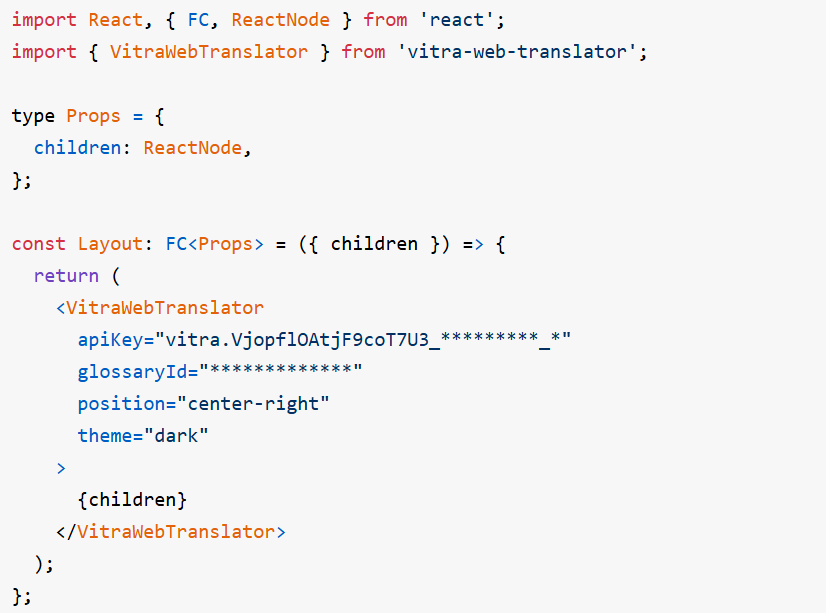
Step 3: Add the Component to Your App
- App Router (Next.js 13+)
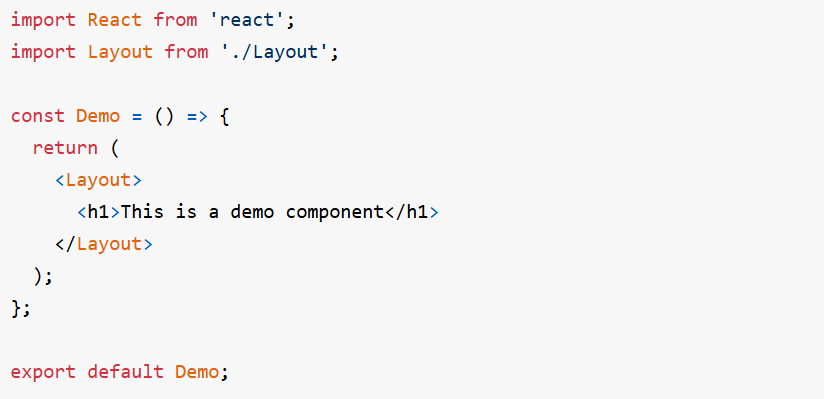
- Once created, the common component can be easily reused across different pages or sections of your application. This ensures a consistent translation experience and simplifies implementation without duplicating code.
What happens after setup?
Once active, Translate.website:
- Translates all Next.js pages
- Works across client-side navigation
- Handles dynamic content
- Preserves layout & styling
- Supports global users instantly