←All Tools
01Figma02Adobe Photoshop03Adobe Illustrator04Adobe Indesign05Microsoft Word06Google Sheets07Canva08Youtube09Instagram10WordPress11Shopify12React JS13Next JS14Vue JS15Angular JS16Nuxt JS17Svelte18Drupal19Django20Flask21Salesforce22Ghost CMS23Hubspot CMS24Custom Integration25XML Translation26Dita Maps27XLIFF Translation28Text Translation29Json Translation30HTML Translation31PPT to Videos32GIF Translation33Blog to Video34Markdown Translation35MIF Translation36Adoc Translation37ASC Translation38ASCII Doc Translation39DocBook Translation40PPT-PPTX Translation41POT Translation42POTX Translation43PPTM Translation44POTM Translation45Dita Translation46PDF Translation47PHP Translation48TTX Translation49YAML/YML Translation50PO Translation51Properties Translation52XTG Translation53IOS Strings54Android Strings55RESX Translation
←All Tools
01Figma02Adobe Photoshop03Adobe Illustrator04Adobe Indesign05Microsoft Word06Google Sheets07Canva08Youtube09Instagram10WordPress11Shopify12React JS13Next JS14Vue JS15Angular JS16Nuxt JS17Svelte18Drupal19Django20Flask21Salesforce22Ghost CMS23Hubspot CMS24Custom Integration25XML Translation26Dita Maps27XLIFF Translation28Text Translation29Json Translation30HTML Translation31PPT to Videos32GIF Translation33Blog to Video34Markdown Translation35MIF Translation36Adoc Translation37ASC Translation38ASCII Doc Translation39DocBook Translation40PPT-PPTX Translation41POT Translation42POTX Translation43PPTM Translation44POTM Translation45Dita Translation46PDF Translation47PHP Translation48TTX Translation49YAML/YML Translation50PO Translation51Properties Translation52XTG Translation53IOS Strings54Android Strings55RESX Translation
Django

Django

Enable multilingual Django applications with Vitra by dynamically translating templates and web content while preserving site structure, performance, and scalability.

Connect

Install Translate.website on Django

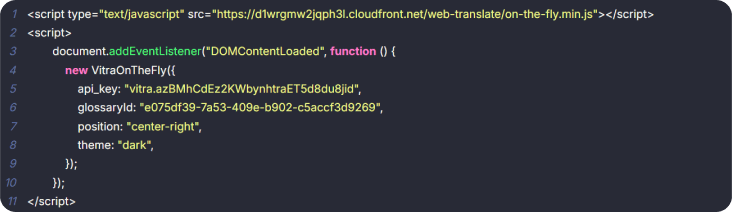
If your website is built using Django, you can easily enable multilingual support by adding a single Vitra snippet to your global template.

Since Django is already inbuilt in your system, no additional packages or configuration are required.

You only need to insert the snippet inside your main layout file so it loads across all pages.

Django overview

Django Integration (Django Already Inbuilt)

  • No changes required in settings, URLs, or views.

How It Works

Step 1: Open Your Base Template

  • Navigate to your Django project and open:
  • templates/base.html
  • (Or the main template file that contains the global <head> section.)

Step 2: Locate the <head> Section

Just above </head>, paste your Vitra / Translate.website snippet.

Step 3: Paste the Vitra Snippet

  • `
  • <!-- Translate Website -->
  • <script>
  • /* Paste Vitra Snippet Here */
  • </script>
  • </head>`

Step 4: Save & Restart

  • Save the file and restart your Django server:
  • python manage.py runserver
Save & Restart

Translate.website is now active

Translate.website is now active across your entire Django application — including all templates extending base.html and dynamic pages.

Footer

Power Your Global Content Strategy with AI Translation

Unlock seamless communication across departments - from Marketing to Ops - with AI-powered translations tailored to your business needs.

Create, Personalize, and Translate Content 100x Faster with GenAI.