Angular JS
AngularJS is a JavaScript framework for building dynamic web applications. It enables two-way data binding and structured frontend development.
Using Translate.website in an AngularJS Project (Pre-Installed Environment)
AngularJS is a JavaScript framework for building dynamic web applications. It enables two-way data binding and structured frontend development.
If AngularJS is already pre-installed in your environment (like a hosting panel, enterprise CMS, or project setup wizard), you don't need to install Angular again. You only need to configure Translate.website inside the AngularJS project structure.

Step-by-Step Configuration
Step 1: Select Project Technology → AngularJS
- When creating a new project:
- Choose AngularJS as the project technology.
- Complete the project setup wizard.
- Deploy / generate the project structure.
Step 2: Locate the Main Entry File
- Your AngularJS app will typically create:
- index.html
- This file loads across all routes using ng-view.
- That's where we integrate Translate.website.
Step 3: Paste the Vitra Snippet in <head>
- Open index.html
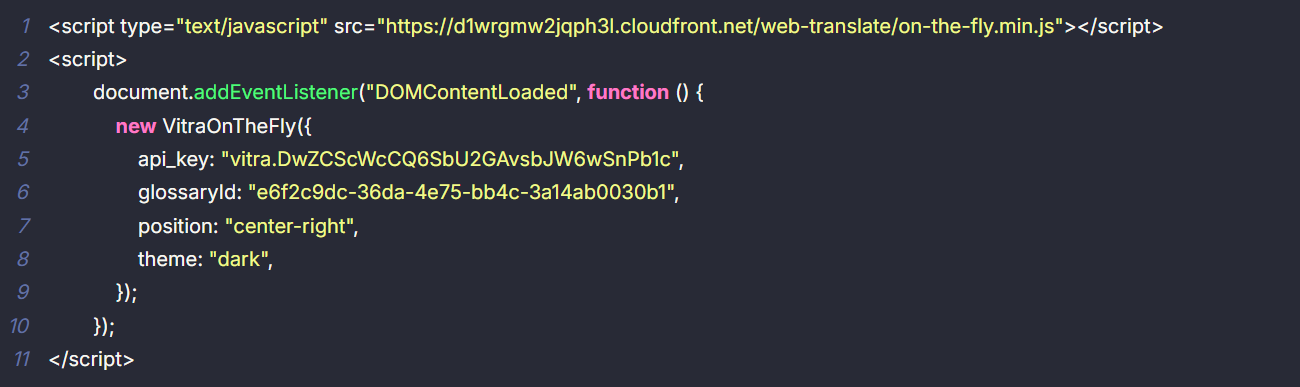
Step 3: No Additional Angular Configuration Needed
- You do NOT need to:
- Modify app.js
- Add Angular modules
- Change routing config
- Inject into controllers
- Touch $scope
Important for AngularJS (Single Page Apps)
Since AngularJS uses client-side routing:
If your site loads content dynamically, make sure:
- The snippet is placed in index.html (global level)
- Not inside a partial view
- Not inside a specific template
This ensures it loads across all routes.
What Happens After Setup?
Once active, Translate.website:
- Translates Angular-rendered content
- Works across ng-view routes
- Detects dynamic DOM updates
- Preserves layout and CSS
- Improves international engagement